What is a VPN, and what changes when you connect?
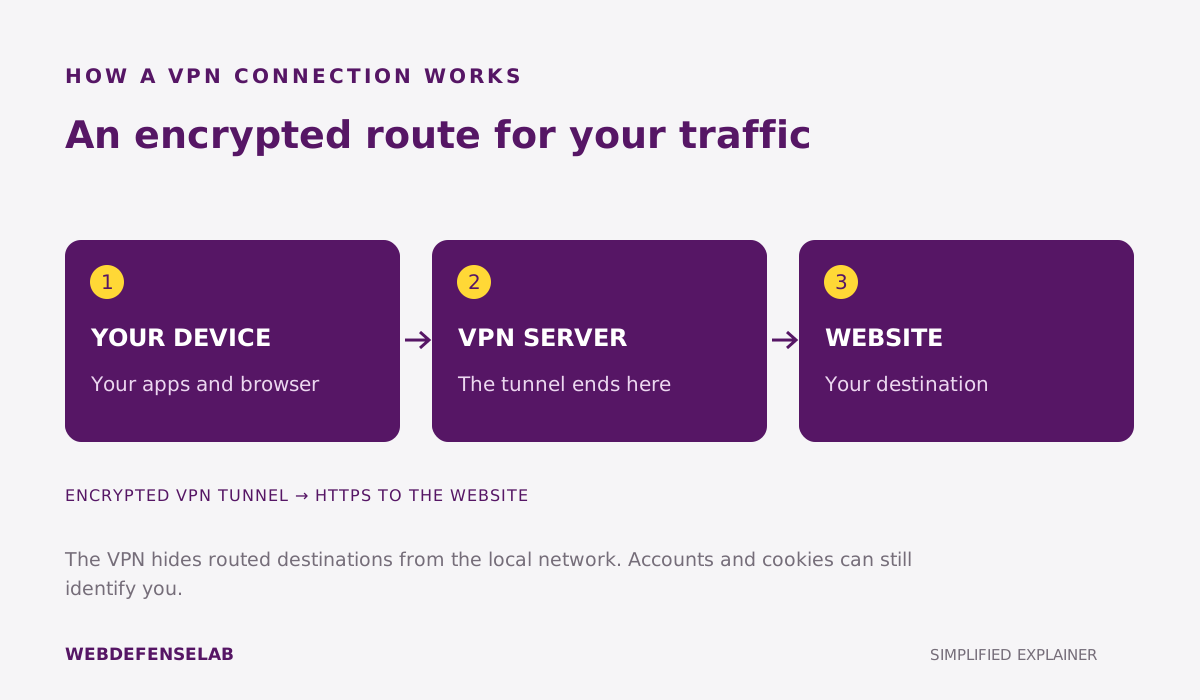
A virtual private network creates an encrypted connection between your device and a VPN server. Traffic covered by that connection travels through the server before reaching its destination. A website will usually see the server’s public IP address instead of the one assigned to your home or mobile connection. The VPN tunnel ends at the server; HTTPS still matters for the journey to the website.
Think about a laptop in a hotel. The hotel network carries the connection to the VPN, while the VPN provider becomes another party you must trust. Signing in to a shopping account still tells the shop who you are. This is a change in routing and visibility, rather than an invisibility switch. The EFF’s VPN guide explains that distinction.
Start with the problem you want to solve
Write down one reason for using a VPN before comparing subscriptions. “I want an additional privacy layer on unfamiliar networks” is a requirement you can investigate. “I want everything on the internet to be safe” is too broad for any single product. A workplace may also require its own VPN; a consumer subscription does not replace an employer’s approved connection.
| Your situation | A useful check |
|---|---|
| Hotel and airport Wi-Fi | Can you complete the network sign-in and then reconnect reliably? |
| Several household devices | Are the actual operating systems and simultaneous connections covered? |
| Voice calls or gaming | Is delay acceptable on your usual network and nearby server? |
| A browser-only privacy need | Do you want a browser extension or a device-wide app? |
For a practical example, compare a phone used on trains with a desktop that stays at home. The phone needs predictable behavior when networks change; the desktop may need clear controls for local printers or selected apps. The same long feature list may conceal very different day-to-day experiences. Our VPN decision guide helps turn those situations into a shortlist.
How to compare VPN services
Start with app availability, the subscription’s device allowance, and a usable cancellation policy. Then read the privacy policy and any published audit carefully. Check who performed the work, its date and scope, and whether findings were addressed. An old assessment of one component should not be treated as a current guarantee about every app or business practice.
Connection controls deserve the same attention as server counts. Find out what the kill switch blocks when the tunnel drops, whether local networking remains available, and what happens after sleep or restart. If you use split tunneling, record which apps bypass the VPN. An exception may solve a problem, but it changes the route for that application.
Finally, compare the total charge and renewal amount. A monthly equivalent paid years in advance is different from a cancel-any-month subscription. Check the conditions for the exact purchase channel you intend to use. A refund window is useful only if you can finish your own evaluation within it.
The best VPN services comparison brings these decisions together. Below, quick reviews link to full assessments of NordVPN, Surfshark, ExpressVPN, Proton VPN, CyberGhost, Private Internet Access, Mullvad, Windscribe, and IVPN.
A sensible first-week setup
- Install the official app on one device and update it before changing advanced settings.
- Connect to a nearby location and try normal browsing, a video call, and any work applications you need.
- Check what happens when you close the laptop, restart the app, or move the phone between networks.
- Review any filtering or split-tunneling exceptions, then repeat the tasks with your intended settings.
- Keep the configuration that works and save the renewal date with your receipt.
Use a small log: device, network, server, setting, result. This makes a support request far more useful than “the internet is slow.” If one service fails, compare its behavior with the VPN disconnected before making several configuration changes at once. Your observations apply to your setup, not to every user or country.
Where other protection still matters
A working tunnel does not repair an infected computer or make a fraudulent payment request trustworthy. Keep software updated, protect important accounts, and read messages carefully. If unwanted ads are the problem, compare content blockers. If suspicious software is the problem, start with device protection and scanning.
Do not use a streaming result from one afternoon as a promise of future access. Services, network rules, and app behavior change. Choose a VPN for the privacy and connectivity functions you can understand and maintain; treat access to a specific third-party service as something to verify separately.
Common questions
Does a VPN make me anonymous?
No. Accounts, information you submit, cookies, and device signals can still identify you. A VPN changes the network route and usually the public IP visible to websites.
Should I leave a VPN on all the time?
Choose a default you can troubleshoot. Try sleep, restart, calls, and local-device access before enabling automatic connection everywhere. Follow workplace rules on managed devices.
Is a free VPN always a bad choice?
No. Assess the provider, privacy terms, device support, data limits, and business model. A free tier may be enough for a narrow need, but it should receive the same scrutiny as a paid service.
Sources and guide notes
Reviewed September 25, 2026. Explanations draw on the documentation below; examples and selection checklists are WebDefenseLab guidance. Product summaries are documentation-based assessments, without hands-on scores.