What antivirus protection actually does
Antivirus software looks for malicious files or behavior and helps contain detected threats. Depending on the product and platform, protection may include real-time monitoring, scans, quarantine, and warnings about dangerous downloads or websites. “Malware” is the broader category; viruses, ransomware, and spyware are different types of malicious software, not interchangeable names for every computer problem.
A useful starting point is the security dashboard already on your device. On Windows, the Windows Security app shows protection status, detected threats, scan options, and protection history. Check which provider is active before installing another suite. Seeing no paid subscription does not automatically mean the computer has no antivirus.
Choose for the operating system, not just the brand
Start with a device inventory: operating system, version, who uses it, and whether someone else manages it. A household with two Windows laptops and two iPhones does not necessarily need the same features on every device. Check the product’s platform-specific feature list before dividing a package price by its advertised device count.
| Device | What to compare |
|---|---|
| Windows PC | Active real-time protection, scan controls, quarantine, and update status |
| Mac | Supported macOS versions, required permissions, and the actual Mac feature set |
| Android phone | App protection, permission requirements, and the trusted installation source |
| iPhone or iPad | Web, account, or identity features; do not expect a desktop-style full-system malware scan |
For example, an iPhone subscription may emphasize web filtering or breach alerts while its Windows counterpart includes a malware scanner. Both can be sold under one brand, but they solve different problems. Our Windows antivirus guide and iPhone security guide explain the relevant comparison separately.
What makes a security suite worth paying for?
Make a two-column list: protection you already use and gaps you need to address. You might value a single household dashboard, clearer support, or a feature that your current setup lacks. A large bundle has little value if its components duplicate services you already maintain or make basic tasks harder to understand.
Evaluate evidence at the product and version level. If a vendor cites an independent lab result, open the original report and check the test period, platform, product edition, and measured category. Detection, false alarms, and system impact are different observations. Our documentation-based reviews do not convert a marketing claim into a hands-on score.
Before buying, compare first-term cost, renewal, covered devices, and cancellation. Check whether a bundled VPN has a data limit and whether identity features work in your country. A password manager or parental-control service may require separate setup even when it appears on the same receipt.
The antivirus comparison and previews below cover Norton, TotalAV, McAfee, Bitdefender, Avast, ESET, and Malwarebytes. The full reviews explain suitable uses and the details to confirm before subscribing.
How to approach a scan and its results
Update the protection software and save your open work. On Windows, a quick scan, full scan, selected-folder scan, and Defender Offline scan serve different purposes. Microsoft’s guide explains that the offline option restarts the computer to scan outside the usual running Windows session. Follow the active provider’s instructions rather than selecting an unfamiliar option simply because it sounds strongest.
- Open the installed security application directly, rather than clicking a frightening advertisement.
- Check updates, then select a scan that matches the concern.
- Read the result, including affected files and the action taken.
- Keep suspicious files quarantined while investigating; do not restore them merely to dismiss the warning.
- If the problem remains, record the alert text and use the provider’s official support route.
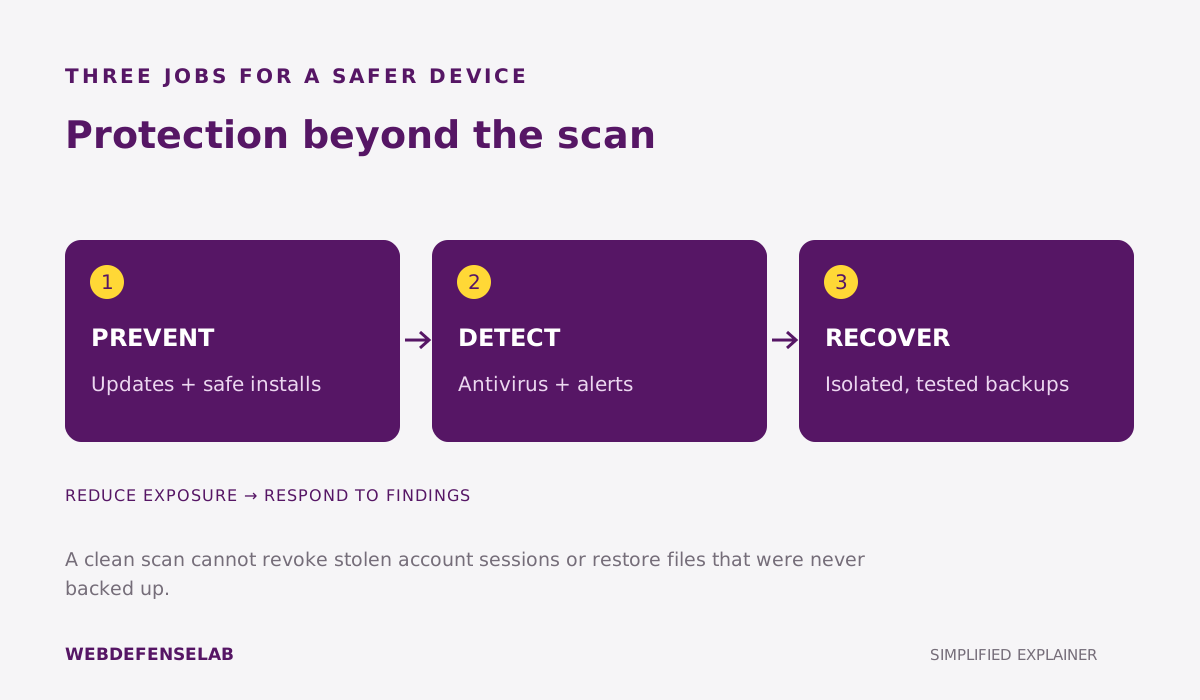
A clean result is useful information, but it is not proof that every account or file is safe. If an attacker may have obtained a password, removing software does not change that password at the service. Use a trusted device to review affected accounts and their recovery settings. For a step-by-step starting point, read how to scan for viruses.
Build a routine around the software
Keep the operating system, browser, and everyday applications updated. Maintain a backup you can restore, with a copy that is not continuously exposed to every change on the working computer. Separate your normal browsing account from administrator tasks where practical. These habits cover failure modes that a scan alone cannot solve.
Avoid making two full real-time antivirus suites compete for the same role. Use the installation and removal instructions for the products involved, including any restart, and then verify the intended provider is active. A second-opinion scan is a different workflow and should follow the scanner’s documented compatibility instructions.
Most importantly, make the setup understandable to the person using the device. Agree on what a legitimate alert looks like and where to get help. A browser page that demands an immediate support call should not become the authority over software installed on the computer.
Common questions
Is paid antivirus necessary on every Windows PC?
Not automatically. Check the built-in protection, your update and backup habits, and any specific gap a paid product would fill. Compare the actual features and support you need.
Can antivirus remove every infection?
No product can guarantee that. Persistent symptoms, stolen account credentials, or damaged files may require additional recovery steps after a scan.
Does a phone need the same antivirus as a laptop?
No. Operating systems allow different kinds of security software. Compare the feature list for your exact phone platform instead of assuming it matches the desktop edition.
Sources and guide notes
Reviewed September 25, 2026. Explanations draw on the documentation below; examples and selection checklists are WebDefenseLab guidance. Product summaries are documentation-based assessments, without hands-on scores.